
Sofware Development
Setting up your first Rails + GraphQL API Copy
July 13, 2020
by
Felipe Cabezudo

In our previous GraphQL article, we went through the basics and some recommendations on how to use GraphQL. In this new article, we are going to explain how to build a basic GraphQL API using Rails.
We will build a basic blog application. Our application will have multiple Users and they will be associated with multiple Posts.
For the sake of simplicity, we will not include authentication. We managed to authenticate users with devise-token_authenticable by following this tutorial. You can check our project repository and see how we implemented it.
To follow this guide you'll need Ruby, RubyGems and PostgreSQL.
Step 1: Initialize a rails project
$ rails new <app_name> --api -T -d postgresql
Step 2: Generate user and post
Create migrations for the model User and Post.
class CreateUsers < ActiveRecord::Migration[6.0]
  def change
    create_table :users do |t|
      t.string :email, null: false, default: ""
      t.timestamps null: false
      t.string :first_name
      t.string :last_name
    end
    add_index :users, :email, unique: true
  end
end
Our post model will only have a title and body.
class CreatePosts < ActiveRecord::Migration[6.0]
  def change
    create_table :posts do |t|
      t.belongs_to :user, null: false, foreign_key: true
      t.string :title
      t.text :body
      t.timestamps
    end
  end
end
Create the database and run the migrations.
$ rails db:create
$ rails db:migrate
Add a has_many relation to the User model and a belongs_to to the Post model.
# app/model/user.rb
class User < ApplicationRecord
  # ...
  has_many :posts
end

# app/models/post.rb
class Post < ApplicationRecord
  # ...
  belongs_to :user
end
Step 3: Add GraphQL, GraphiQL Gem, and install gems.
# Gemfile
gem 'graphql', '~> 1.10', '>= 1.10.9'
gem 'graphiql-rails', '~> 1.7'
And then run $ bundle install
Step 4: Generate GraphQL files.
$ rails g graphql:install
Step 5: Mount GraphiQL.
If necessary, create app/assets/config/manifest.js and link the GraphiQL assets.
//= link graphiql/rails/application.css
//= link graphiql/rails/application.js
Given that we initialized our project as an API, we will need to require sprockets on our application.rb to be able to mount GraphiQL.
# config/application.rb
require "sprockets/railtie"
...
Include GraphiQL route at routes.rb
Rails.application.routes.draw do
  post "/graphql", to: "graphql#execute"

  if Rails.env.development?
    mount GraphiQL::Rails::Engine, at: "/graphiql", graphql_path: "/graphql"
  end
end
The GraphiQL route should only be included in the development environment. If we include GraphiQL in production, intruders can access our graph schema and possibly exploit vulnerabilities in our App.
Step 6: Define types
As discussed in our previous article, our schema is defined by the types, queries, mutations, and subscriptions.
Let's start by defining our UserType.
# app/graphql/types/user_type.rb
module Types
  class UserType < Types::BaseObject
    field :id, ID, null: false
    field :email, String, null: false
    field :first_name, String, null: false
    field :last_name, String, null: false
    field :full_name, String, null: false
    field :posts, [Types::PostType], null: true

    def full_name
      "#{object.first_name} #{object.last_name}"
    end
  end
end
Our UserType has every attribute that we defined for our user model except for the timestamps, you can include them by adding them as a field.
Note that the full_name field is calculated based on the current object.
Then create the PostType.
# app/graphql/types/post_type.rb
module Types
  class PostType < Types::BaseObject
    field :id, ID, null: false
    field :title, String, null: false
    field :body, String, null: false
    field :user, Types::UserType, null: false, preload: :user
    field :created_at, String, null: false
  end
end
Note that we are using preload on our user field, this DSL (Domain-specific Language) is provided by the graphql-preload gem, when loading an object it preloads the specified associations, this helps prevent N+1 queries.
Declare Queries and Mutations.
Now that we have our types and models created and linked, let see how Queries and Mutations are built!
Take a look at the autogenerated GraphQL files, among them you can find <app_name>_schema.rb, mutation_type.rb and query_type.rb.
We can define queries on the query_type.rb, but to keep the project structure as clean as possible, we are going to declare them at the graphql/queries folder (if you don't have it, just create it).
First, we will have to define a BaseQuery.
# app/graphql/queries/base_query.rb
module Queries
  class BaseQuery < GraphQL::Schema::Resolver
  end
end
Now we are ready to create our first query!
Notice that we are defining the return type with the type keyword, we are using PostType.connection_type to benefit from pagination, more on that at the graphql-ruby documentation.
# app/graphql/queries/posts.rb
module Queries
  class Posts < Queries::BaseQuery
    description 'list all posts'

    type Types::PostType.connection_type, null: false
    def resolve
      ::Post.all
    end
  end
end
You can define extra methods here, the resolver will be the one in charge of fulfilling the request.
In a similar manner, we define the users query.
# app/graphql/queries/users.rb
module Queries
  class Users < Queries::BaseQuery
    description 'list all Users'

    type Types::UserType.connection_type, null: false
    def resolve
      ::User.all
    end
  end
end
So far we've built queries to retrieve all the users and all the posts. Note that neither of these two queries had input values. If you wanted to have input fields on a query you can specify them as arguments.
Let's build queries using arguments, for example, retrieve users and posts by id.
# app/graphql/queries/user.rb
module Queries
  class User < Queries::BaseQuery
    description 'get user by id'

    type Types::UserType, null: false
    argument :id, Integer, required: true

    def resolve(id:)
      ::User.find(id)
    end
  end
end# app/graphql/queries/post.rb
module Queries
  class Post < Queries::BaseQuery
    description 'get post by id'

    type Types::PostType, null: false
    argument :id, Integer, required: false

    def resolve(id:)
      ::Post.find(id)
    end
  end
end
For the pagination to work we will have to enable the connection_type at the <app_name>_schema.rb (this should be enabled by default).
# app/graphql/<app_name>_schema.rb
class GraphqlApiSchema < GraphQL::Schema
  mutation(Types::MutationType)
  query(Types::QueryType)

  # Add built-in connections for pagination
  use GraphQL::Pagination::Connections
end
Then, for us to add this query to the schema, we will have to specify a field for this query on our query type with the resolver we just declared.
If you are familiar with rails, then this step should look similar to defining routes for new endpoints, just specify the name of the filed and the resolver.
# app/graphql/types/query_type.rb
module Types
  class QueryType < Types::BaseObject
    field :posts, resolver: Queries::Posts
    field :users, resolver: Queries::Users
    field :user, resolver: Queries::User
    field :post, resolver: Queries::Post
  end
end
Typing out our queries
Up to this point, our database is empty. We can manually create Users and Posts from the rails console. Once we have some models in our database we can start testing our queries.
Start the rails server, open a browser, and go to http://localhost:3000/graphiql.
You can write and execute queries at GraphiQL. Also, thanks to the introspections queries it comes packed with auto-completion!
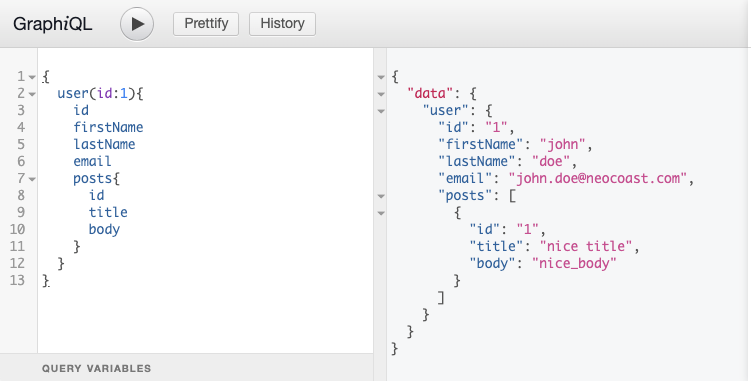
In the right box, we can write down the query. Once executed the result will come up on the left-side section.
Mutations
For mutations, we won't need to generate a folder, because it's created by default.
Given that we are going to use very similar inputs to update and create posts, we strongly suggest defining a PostAttribute input-type to specify the common input parameters, you can specify the required arguments one by one for each mutation, but you will probably end up with repeated code blocks (Don't Repeat Yourself).
# app/graphql/types/post_attributes.rb
module Types
  class PostAttributes < Types::BaseInputObject
    description "Attributes for creating or updating a post"

    argument :title, String, required: false
    argument :body, String, required: false
  end
end
The fields of the inputObjects are specified as arguments.
When defining a mutation try to use consistent naming. For example, we will create two mutations CreatePost and UpdatePost.
# app/graphql/mutations/create_post.rb
module Mutations
  class CreatePost < Mutations::BaseMutation
    graphql_name "CreatePost"
    argument :attributes, Types::PostAttributes, required: true
    argument :user_id, Integer, required: true
    field :post, Types::PostType, null: false

    def resolve(attributes:, user_id:)
      user = User.find(user_id)
      post = user.posts.create(attributes.to_h)
      MutationResult.call(
        obj: { post: post },
        success: post.persisted?,
        errors: post.errors
      )

    rescue ActiveRecord::RecordInvalid => invalid
      GraphQL::ExecutionError.new(
        "Invalid Attributes for #{invalid.record.class.name}: " \
        "#{invalid.record.errors.full_messages.join(', ')}"
      )
    end
  end
end
The fields of the inputObjects are specified as arguments.
# app/graphql/mutations/update_post.rb
module Mutations
  class UpdatePost < Mutations::BaseMutation
    graphql_name "UpdatePost"

    argument :attributes, Types::PostAttributes, required: true
    argument :id, ID, required: true

    field :post, Types::PostType, null: false

    def resolve(id:, attributes:)
      post = Post.find(id)
      post.update(attributes.to_h)
      MutationResult.call(
        obj: { post: post },
        success: post.persisted?,
        errors: post.errors
      )
    rescue ActiveRecord::RecordInvalid => invalid
      GraphQL::ExecutionError.new(
        "Invalid Attributes for #{invalid.record.class.name}: " \
        "#{invalid.record.errors.full_messages.join(', ')}"
      )
    end
  end
end
And then, we add it to the mutation_type.rb as a field like we did for queries.
# app/graphql/types/mutation_type.rb
module Types
  class MutationType < Types::BaseObject
    field :create_post, mutation: Mutations::CreatePost
    field :update_post, mutation: Mutations::UpdatePost
    field :create_user, mutation: Mutations::CreateUser
  end
end
Testing your API
For testing integration, we can call the <app_name>Schema.execute(query). This method will execute the given query on our schema and return the response object.
For example, let us test the list all posts query.
require "rails_helper"

RSpec.describe Queries::Posts do
  describe "posts" do
    let!(:users) { create_list(:user, rand(1..10)) }
    let!(:posts) { create_list(:post, rand(1..10), user: users.sample(1)[0]) }

    let(:query) do
      %(query {
        posts {
          nodes{
            title
            body
            user{
              firstName
              lastName
            }
          }
        }
      })
    end

    subject(:result) do
      SimplifiedApiSchema.execute(query).as_json
    end

    it "should return the created post" do
      expect(result.dig("data", "posts", "nodes")).to match_array(
        posts.map do |post|
          {
            "title" => post.title,
            "body" => post.body,
            "user" => {
              "firstName" => post.user.first_name,
              "lastName" => post.user.last_name
            }
          }
        end
      )
    end
  end
end
When using authentication, you can specify the current_user as context when calling the execute method.
require "rails_helper"

RSpec.describe Mutations::CreateUser do
  describe "Create user with proper data" do
    let(:user_attrs) { attributes_for(:user) }

    let(:mutation) do
      %(mutation{
        createUser(
          input:{
            attributes: {
              firstName: "#{user_attrs[:first_name]}",
              lastName: "#{user_attrs[:last_name]}",
              email: "#{user_attrs[:email]}"
            }
          }
        )
        {
          user {
            email
          }
        }
      })
    end

    subject(:result) do
      SimplifiedApiSchema.execute(mutation).as_json
    end

    it "should create user" do
      expect(result.dig("data", "createUser", "user")).to include({
        "email" => user_attrs[:email]
      })
    end
  end
end
If we wanted to test transport-layer behavior, we could rewrite the spec to POST the query to our GraphQL endpoint (keep in mind that our GraphQL endpoint only receives POST requests).
require "rails_helper"

RSpec.describe Mutations::CreateUser, type: :request do
  describe "POST /graphql create_user with proper data " do
    let(:user_attrs) { attributes_for(:user) }

    let(:mutation) do
      %(mutation{
        createUser(
          input:{
            attributes: {
              firstName: "#{user_attrs[:first_name]}",
              lastName: "#{user_attrs[:last_name]}",
              email: "#{user_attrs[:email]}"
            }
          }
        )
        {
          user {
            email
          }
        }
      })
    end

    let(:expected_response) do
      {
        "data" => {
          "createUser" => {
            "user" => {
              "email" => user_attrs[:email]
            }
          }
        }
      }
    end
    it "should return my email" do
      post '/graphql', params: { query: mutation }
      expect(JSON.parse(response.body)).to eq(expected_response)
    end
  end
end
Suggestions
- Use graphql-preload gem: it allows ActiveRecord associations to be preloaded in field definitions. Preloading nested associations will improve the performance overall, given that it prevents N+1 queries.
- For token-based authentication, you can use
devise-token_authenticablegem, this tutorial covers authentication using that gem. - By default the GraphQL gem wants you to declare the queries at
query_type.rb, this can make this file quite large. To avoid this kind of issues create a Queries folder, then glue them together at thequery_type.rb, this will keep a cleaner code at the query_type.rb. - When using GraphiQL gem, make sure that the route generated isn't included in production.
- At mutations, define types for inputs. This is a good practice because you can reuse this type for multiple mutations and you won't have to rewrite the same inputs for similar mutations (DRY).
- Use pagination. The connection type comes with the graphql-ruby gem. Check this guide to see how to use the
connection_type.


