
Sofware Development
Introduction to GraphQL
July 2, 2020
by
Felipe Cabezudo

"GraphQL, despite the name, isn't simply a query language. It's a comprehensive solution to the problem of connecting modern apps to services in the cloud. As such, it forms the basis for a new and important layer in the modern application development stack: the data graph. This new layer brings all of a company's app data and services together in one place, with one consistent, secure, and easy-to-use interface, so that anyone can draw upon it with minimal friction."
— Principled GraphQL
REST vs GraphQL
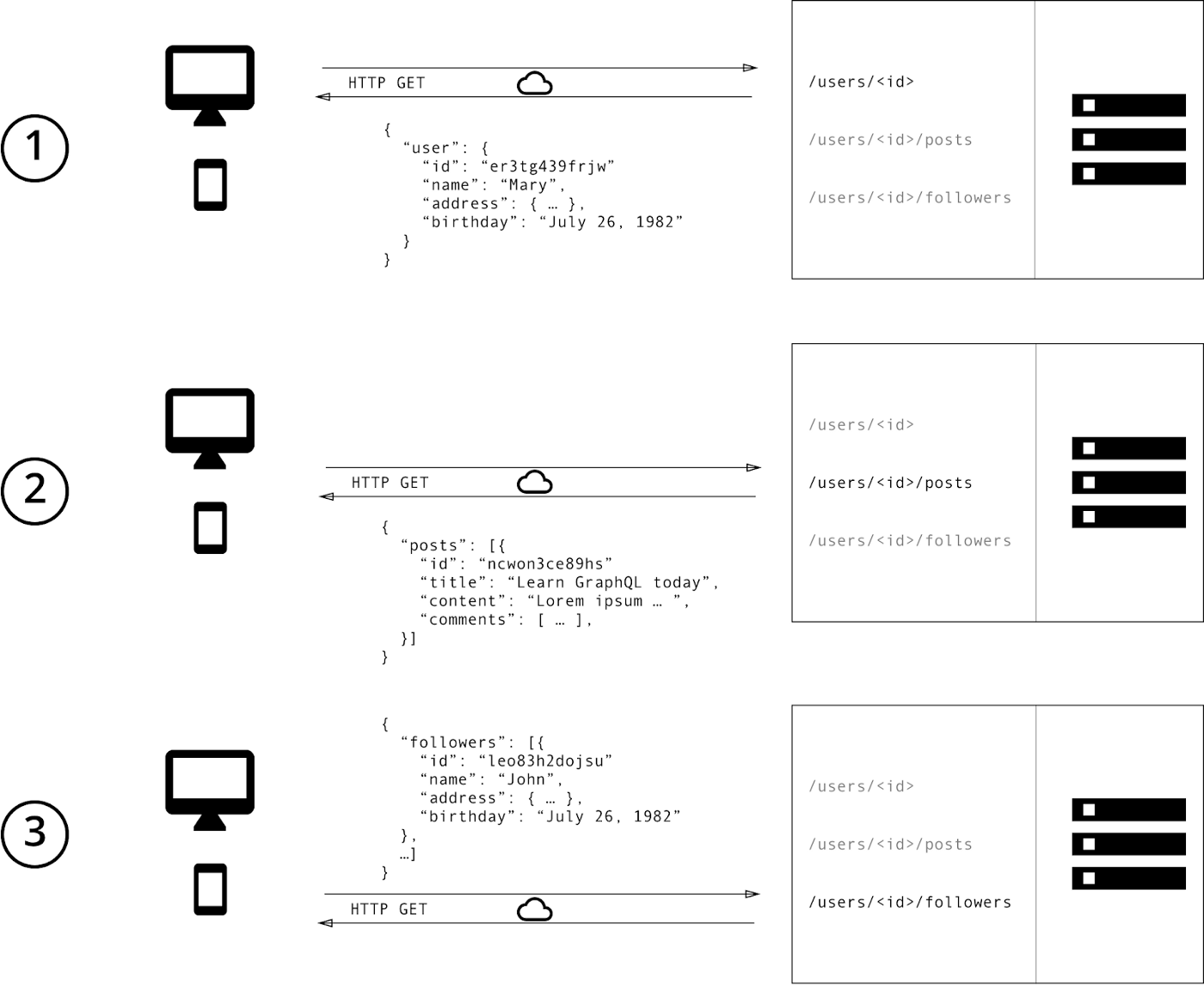
The API-REST architecture suggests that we should retrieve its data according to the routes we are requesting. Let's say that you want to get the data for a user in our system with id=1. If we were to ask the API for this data, we would need to make a GET request to /users/1 to retrieve this user's data.
Now, let's assume that we have posts associated with this user, and we want to ask the API for both the user and its posts. Given how REST works we would have to query for the user /users/1 and its posts /users/1/posts no big problem… BUT! We are making two queries to get the data we need, this means that we will have two roundtrips just to get a user and its posts. To solve this, we may have to create a new endpoint to get all the data at once, but we may still have prone issues.
Another big problem with the REST architecture is that we are prone to get more data than we want. Imagine that we have a profile view of our application. This view shows user data like name, nickname, bio, etc. And posts basic information like title, date of creation, and the number of comments for each post. When we request the API for the posts information for this user we will get all the posts information (title, comments, body, replies, etc.). That's good, but we only want to display the titile, date of creation and the number of comments. So, therefore, the body information is unnecessary.
This problem is called Over-fetching, similarly, we could need certain post data that isn't provided to us by the queried endpoint and have to make another request to a different endpoint to retrieve the missing data, this problem is called Under-fetching.
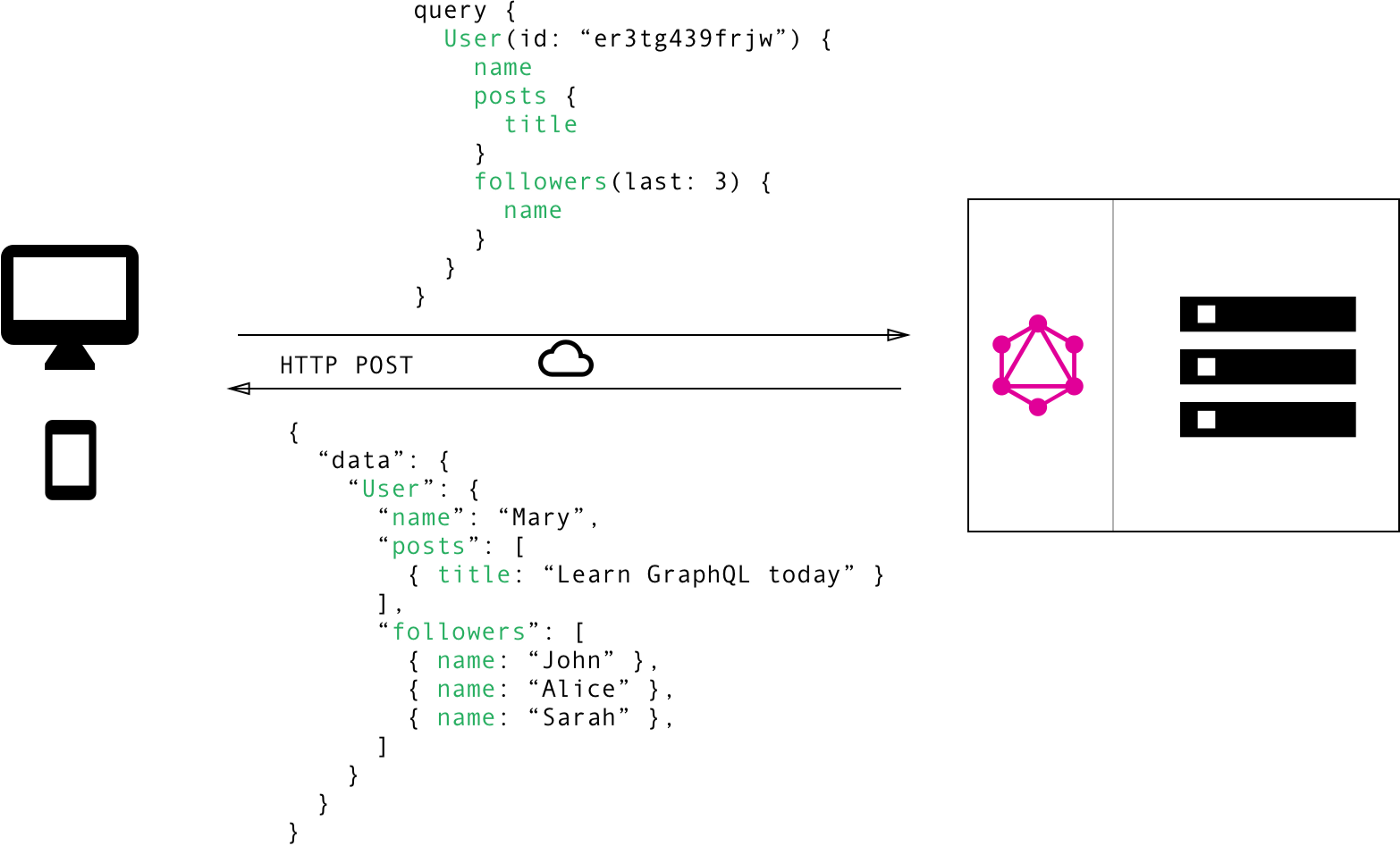
GraphQL, on the other hand, arises from the necessity to address both problems by implementing a single endpoint and a query language! By defining types, queries, and mutations we can ask for whatever data structure and its nested associations in our schema with only a single query.
Now, going back a little to our imaginary posts app, imagine that we need the same user that we queried for the REST API with its posts, in GraphQL we could query the /graphql endpoint of the API and ask for the user with id=1 and its posts in a single query. We can do that given that the posts are associated with the users at the schema. As for the profile page that we discussed above, with GraphQL we can ask for the data we want to avoid the Over-fetching and Under-fetching issues.
How does GraphQL works?
GraphQL defines a schema. This schema is defined by the set of types, queries, mutations, and subscriptions, (for the sake of simplicity this article is going to focus on types, queries, and mutations).
Types
type User {
  id: ID!
  firstName: String!
  lastName: String!
  posts: [Post]!
}
By defining types you'll define the structures that the queries/mutations will return. For example, a user will have a string field for the name, an integer field for the id, etc. We can also use types that we've defined to define a new type. For instance, we can add posts to the user as an array of the post type.
Queries
user(id: "1") {
  firstName
  lastName
  posts {
    title
    body
  }
}
Unlike mutations, Queries don't affect the status of the application. Each query is a data request. You can query for whatever data from the defined types, as long as they are requested in the right order.
Mutations
mutation {
  registerUser(
    input: {
      email: "john.doe@neocoast.com"
      firstName: "john"
      lastName: "doe"
      password: "strongPassword"
    }
  ) {
    user {
      email
      authenticationToken
      id
    }
  }
}
Mutations are like posts of the API-Rest. The mutations are typically used to persist changes on the application database. For example, you can create a mutation to register a user, and one to create a post. When the mutation is successful it returns the specified values for the response.
Conclusions
GraphQL is a really powerful API standard. Given its query language and that it works over a single endpoint, implementing a GraphQL API can be intuitive.
Another solid point in favor of GraphQL is that it handles syntactical and validation errors, so there's no need for the developer to manage them.
The way it structures data as a graph is crucial to avoid Over-fetching and Under-fetching. The graph structure helps to navigate through the associations and get the data we need for each view, without making major changes to our backend.
It's not all roses, given that GraphQL works over a single endpoint this difficult the CDN caching and there's nothing we can do about it. However, we can cache at the application level using a GraphQL client, such as Apollo.
Another thing to take into consideration is that GraphQL does come with a higher complexity than we are used to, for it to work you'll need to define types, queries, mutations, resolvers and you may have some hard time getting used to it.
It may take some time for you to get used to this new architecture, but once you get the basics you'll find the whole process of implementing a GraphQL API pretty intuitive!
Notable mentions
GraphiQL
It's a "graphical interactive in-browser GraphQL IDE". When developing a GraphQL API GraphiQL comes in very handy to test and build both, queries and mutations. Also, it has autocompletion so you can check what fields are in a certain type!
Community
It's a less mature community but is constantly growing, and by now you can find multiple heavyweights of the internet like Facebook, GitHub, or even Twitter that are using it in a way or another.
Documentation
The documentation is quite straightforward, and given its recent boom is pretty easy to find a guide on how to integrate GraphQL to your favorite web development framework.
Hasura
Setting up a GraphQL API is a couple of clicks away with Hasura. "It's an open-source engine that connects to your databases & microservices and auto-generates a production-ready GraphQL backend". By using a Heroku template you can create your Hasura app in less than 5 minutes. Also, it lets you connect to remote APIs by just indicating the remote API graphQL endpoint.
Hasura comes packed with GraphiQL to let you test and build your mutations and queries.
Good practices
- Given that the response data is mostly text, gzip can improve response time and reduce its size, GraphQL behaves exceptionally well with gzip.
- Use Pagination.
- Use Server-side batching and caching to avoid unnecessary queries to the database.
- Consistent Naming: use camelCase for the fields and PascalCase for the names of types. Use this format for mutations
<action><type>(i.e CreateUser, CreatePost, EditUser, etc.).


